
Active Directory integration with Ruckus Unleashed
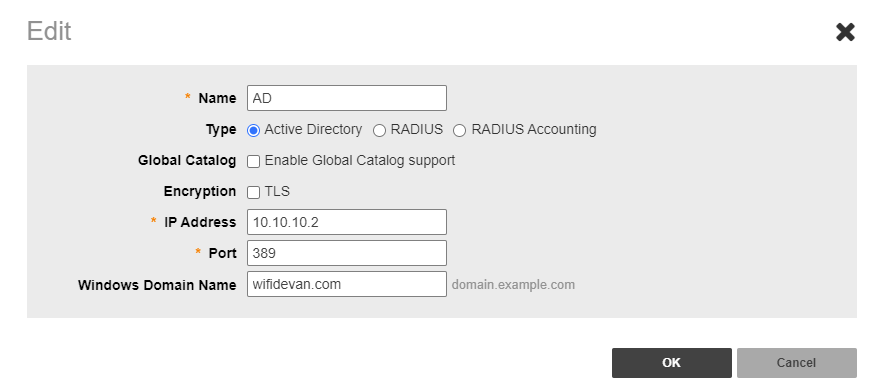
Unleashed allows direct AD integration without a RADIUS server for WLAN access. This direct integration is available on Unleashed and SmartZone, but not on Ruckus Cloud.
Unleashed allows direct AD integration without a RADIUS server for WLAN access. This direct integration is available on Unleashed and SmartZone, but not on Ruckus Cloud.
AAA Server
You will need to first add your AD as an AAA server. Configure the IP address, port number (default LDAP port is 389), and domain name.

WLAN Setup
Configure a new SSID with Web Authentication enabled.
- Authentication Method: Open (Don’t choose 802.1X we are not using a RADIUS server)
- Encryption Method: None (If you choose WPA2 or WPA3, then your users will need to know the passphrase to even get into the web authentication portal)
- Authentication Server: Use the AD server you configured in the previous step

User Role
For AD integration to work without RADIUS, you need to create a new user role under System-> Roles-> create new
You need to pass a group attribute “Ruckus-WSG-User-<name>” and this has to exactly match a group in AD under the same name. In my setup, I have used Ruckus-WSG-User-helpdesk.

Active Directory Setup
Create a new group matching the same group attribute you created in Unleashed and add users to it. In my setup, I added just one user. You can add a group or all domain users.


Now your users can access the WLAN using a web authentication portal using their AD credentials. Unless you choose WPA2 or WPA3 here, there will no encryption on this network. I recommend you to use a RADIUS server for a more secure network.