Sản phẩm nổi bật
Huawei
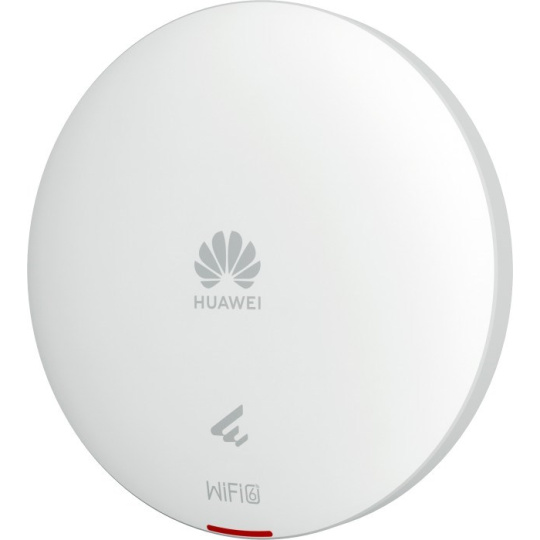
Thiết bị phát sóng wifi Huawei AP263 (11ax indoor,2+2 dual bands,smart antenna,USB,BLE)
Liên hệ
Yêu cầu báo giá
 Hàng chính hãng
• Data Rate: 2.975Gbps
• Maximum transmit power: 20dBm
• 1 x GE Copper
• Support Leader AP, WAC free, license free
• Support Cloud management, Support PSK, Portal, SMS, Social media Authentication
• Support WPA3 protocol, DTLS Hardware Encryption
• Support Telemetry, collecting AP status real-time
Giao hàng toàn quốc. Chúng tôi sử dụng các dịch vụ giao hàng và thanh toán tại nhà (COD) của Giaohangtietkiem, Viettel Post, GHN và những dịch vụ khác để giao hàng đến quý khách hàng trong thời gian sớm nhất.
| Item | Details |
|---|---|
| Description | AP362(11ax indoor,2+2 dual bands,smart antenna) |
| Part Number | 50085706 |
| Model | AP362 |
| First supported version | V200R021C11 |


|
1 |
DC12V |
2 |
GE0/PoE_IN |
|
3 |
Security slot |
- |
- |
| Port | Connector Type | Description | Available Components |
|---|---|---|---|
| GE0/PoE_IN | RJ45 | 10/100/1000M auto-sensing Ethernet electrical port that connects to the wired Ethernet and supports PoE input. |
Network cable |
| DC 12V | DC connector | Connects to a 12 V power adapter. |
12 V DC power adapter |

The indicator is located inside the panel, which turns on after the AP is powered on.
|
1 |
Indicator |
2 |
Default |
| Silkscreen | Name | Color | Status | Description |
|---|---|---|---|---|
| - | System indicator | Green | Steady on | The AP is just powered on and the software is not started yet. |
| Green | Steady on after blinking once | After the system is reset and starts uploading the software, the indicator blinks green once. Until the software is uploaded and started, the indicator remains steady green. | ||
| Green | Slow blinking (0.5 Hz) | The AP runs in Fat or Fit mode, the Ethernet connection is normal, and STAs are associated with the AP. | ||
| Green | Slow blinking (0.2 Hz) | The AP runs in Fat or Fit mode, the Ethernet connection is normal, and no STA is associated with the AP. | ||
| Green | Blinking once every 0.25s (4 Hz) |
The AP works in Fat or Fit mode.
|
||
| Blue | Slow blinking (0.5 Hz) | The AP works in cloud mode, has gone online on the cloud management controller, and is running properly. | ||
| Blue | Blinking once every 0.25s (4 Hz) | The AP works in cloud mode and is connecting to the cloud management controller (including reconnection after disconnection). | ||
| Red | Steady on | A fault that affects services has occurred, such as a DRAM detection failure or system software loading failure. The fault cannot be automatically rectified and must be rectified manually. |
| Silkscreen | Name | Description |
|---|---|---|
| Default | Reset button | If you press the button, the device resets; if you hold down the button for more than 6 seconds, the device restores the factory settings, switches to the Fit mode, and restarts. |
| Item | Specification |
|---|---|
| Installation Type |
|
| Dimensions without packaging (H x W x D) [mm(in.)] | Diameter x depth: 180 mm x 35 mm (7.09 in. x 1.38 in.) |
| Dimensions with packaging (H x W x D) [mm(in.)] | 52 mm x 231 mm x 200 mm (2.05 in. x 9.09 in. x 7.87 in.) |
| Weight without packaging [kg(lb)] | 0.46 kg (1.01 lb) |
| Weight with packaging [kg(lb)] | 0.80 kg (1.76 lb) |
| Storage | NAND Flash 256 MB |
| Console port | None |
| Maximum power consumption [W] | 11.2 W |
| Power supply mode |
|
| Rated input voltage [V] | 12 V |
| Input voltage range [V] |
DC: 12 V ± 10% PoE: 802.3af |
| Service port surge protection |
PoE port: Common mode (8 wires to ground): 4 kV (1.2/50 us, 42 ohms), criterion C |
| Maximum number of physical ports on the entire device | GE (RJ45) x 1, 10M/100M/1000M auto-sensing |
| Long-term operating temperature [°C(°F)] | –10°C to +50°C (14°F to 122°F) (If the altitude is in the range of 1800 m to 5000 m, the temperature decreases by 1°C or 1.8°F every time the altitude increases by 300 m.) |
| Storage temperature [°C(°F)] | –40°C to +70°C (–40°F to +158°F) |
| Long-term operating relative humidity [RH] | 5% RH to 95% RH |
| Long-term operating altitude [m(ft.)] | –60 m to +5000 m (–196.85 ft to +16404.20 ft) |
| Atmospheric pressure [kPa] | 53kPa - 106kPa ETSI 300 019-2-3 |
| Ground | floating ground |
| BLE | Not supported |
| Radio number | 2 |
| Operating frequency band |
|
| MIMO spatial streams |
Radio 0 (2.4 GHz): 2x2 Radio 1 (5 GHz): 2x2 |
| Wi-Fi standard |
2.4G: 802.11b/g/n/ax 5G: 802.11a/n/ac/ac Wave 2/ax |
| Radio interface | Built-in smart antennas |
| Antenna gain |
2.4G: 4 dBi/chain (peak) 2 dBi (combined gain) 5G: 5 dBi/chain (peak value) 3 dBi (combined gain) |
| Maximum transmit power |
2.4G: 20 dBm/chain 23 dBm (combined power) 5G: 20 dBm/chain 23 dBm (combined power) |
| Singal radio transmit power [dBm] |
2.4G: -10 dBm to 20 dBm/chain 5G: -10 dBm to 20 dBm/chain |
| MTBF [year] | 205.07 year |
| MTTR [hour] | 0.5 hour |
| Frequency stability [ppm] | +/-20 |
| 802.3bt power supply description | No function is limited. |
| 802.3at power supply description | No function is limited. |
| 802.3af power supply description | No function is limited. |
| DC power supply description | No function is limited. |
| Item | Details |
|---|---|
| Description | AP362(11ax indoor,2+2 dual bands,smart antenna) |
| Part Number | 50085706 |
| Model | AP362 |
| First supported version | V200R021C11 |
|
1 |
DC12V |
2 |
GE0/PoE_IN |
|
3 |
Security slot |
- |
- |
| Port | Connector Type | Description | Available Components |
|---|---|---|---|
| GE0/PoE_IN | RJ45 | 10/100/1000M auto-sensing Ethernet electrical port that connects to the wired Ethernet and supports PoE input. |
Network cable |
| DC 12V | DC connector | Connects to a 12 V power adapter. |
12 V DC power adapter |
The indicator is located inside the panel, which turns on after the AP is powered on.
|
1 |
Indicator |
2 |
Default |
| Silkscreen | Name | Color | Status | Description |
|---|---|---|---|---|
| - | System indicator | Green | Steady on | The AP is just powered on and the software is not started yet. |
| Green | Steady on after blinking once | After the system is reset and starts uploading the software, the indicator blinks green once. Until the software is uploaded and started, the indicator remains steady green. | ||
| Green | Slow blinking (0.5 Hz) | The AP runs in Fat or Fit mode, the Ethernet connection is normal, and STAs are associated with the AP. | ||
| Green | Slow blinking (0.2 Hz) | The AP runs in Fat or Fit mode, the Ethernet connection is normal, and no STA is associated with the AP. | ||
| Green | Blinking once every 0.25s (4 Hz) |
The AP works in Fat or Fit mode.
|
||
| Blue | Slow blinking (0.5 Hz) | The AP works in cloud mode, has gone online on the cloud management controller, and is running properly. | ||
| Blue | Blinking once every 0.25s (4 Hz) | The AP works in cloud mode and is connecting to the cloud management controller (including reconnection after disconnection). | ||
| Red | Steady on | A fault that affects services has occurred, such as a DRAM detection failure or system software loading failure. The fault cannot be automatically rectified and must be rectified manually. |
| Silkscreen | Name | Description |
|---|---|---|
| Default | Reset button | If you press the button, the device resets; if you hold down the button for more than 6 seconds, the device restores the factory settings, switches to the Fit mode, and restarts. |
| Item | Specification |
|---|---|
| Installation Type |
|
| Dimensions without packaging (H x W x D) [mm(in.)] | Diameter x depth: 180 mm x 35 mm (7.09 in. x 1.38 in.) |
| Dimensions with packaging (H x W x D) [mm(in.)] | 52 mm x 231 mm x 200 mm (2.05 in. x 9.09 in. x 7.87 in.) |
| Weight without packaging [kg(lb)] | 0.46 kg (1.01 lb) |
| Weight with packaging [kg(lb)] | 0.80 kg (1.76 lb) |
| Storage | NAND Flash 256 MB |
| Console port | None |
| Maximum power consumption [W] | 11.2 W |
| Power supply mode |
|
| Rated input voltage [V] | 12 V |
| Input voltage range [V] |
DC: 12 V ± 10% PoE: 802.3af |
| Service port surge protection |
PoE port: Common mode (8 wires to ground): 4 kV (1.2/50 us, 42 ohms), criterion C |
| Maximum number of physical ports on the entire device | GE (RJ45) x 1, 10M/100M/1000M auto-sensing |
| Long-term operating temperature [°C(°F)] | –10°C to +50°C (14°F to 122°F) (If the altitude is in the range of 1800 m to 5000 m, the temperature decreases by 1°C or 1.8°F every time the altitude increases by 300 m.) |
| Storage temperature [°C(°F)] | –40°C to +70°C (–40°F to +158°F) |
| Long-term operating relative humidity [RH] | 5% RH to 95% RH |
| Long-term operating altitude [m(ft.)] | –60 m to +5000 m (–196.85 ft to +16404.20 ft) |
| Atmospheric pressure [kPa] | 53kPa - 106kPa ETSI 300 019-2-3 |
| Ground | floating ground |
| BLE | Not supported |
| Radio number | 2 |
| Operating frequency band |
|
| MIMO spatial streams |
Radio 0 (2.4 GHz): 2x2 Radio 1 (5 GHz): 2x2 |
| Wi-Fi standard |
2.4G: 802.11b/g/n/ax 5G: 802.11a/n/ac/ac Wave 2/ax |
| Radio interface | Built-in smart antennas |
| Antenna gain |
2.4G: 4 dBi/chain (peak) 2 dBi (combined gain) 5G: 5 dBi/chain (peak value) 3 dBi (combined gain) |
| Maximum transmit power |
2.4G: 20 dBm/chain 23 dBm (combined power) 5G: 20 dBm/chain 23 dBm (combined power) |
| Singal radio transmit power [dBm] |
2.4G: -10 dBm to 20 dBm/chain 5G: -10 dBm to 20 dBm/chain |
| MTBF [year] | 205.07 year |
| MTTR [hour] | 0.5 hour |
| Frequency stability [ppm] | +/-20 |
| 802.3bt power supply description | No function is limited. |
| 802.3at power supply description | No function is limited. |
| 802.3af power supply description | No function is limited. |
| DC power supply description | No function is limited. |
Giao hàng toàn quốc. Chúng tôi sử dụng các dịch vụ giao hàng và thanh toán tại nhà (COD) của Giaohangtietkiem, Viettel Post, GHN và những dịch vụ khác để giao hàng đến quý khách hàng trong thời gian sớm nhất.
Huawei